Connect Zendesk to n8n automation (2026 Guide)

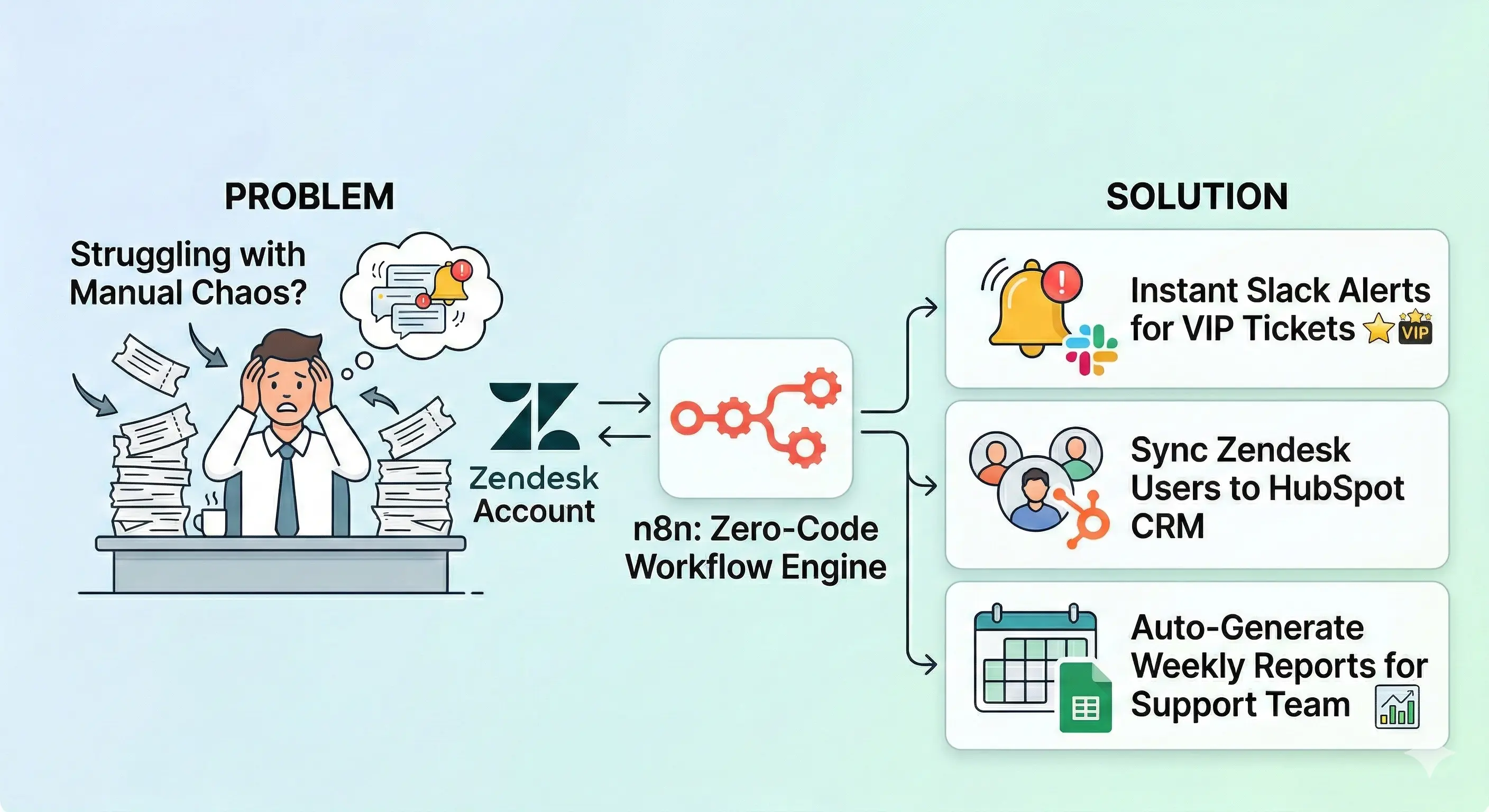
Struggling with manual ticket chaos in your Zendesk account?** This Zendesk n8n tutorial walks you through connecting Zendesk to n8n with zero code. Get instant Slack alerts for VIP tickets, sync Zendesk users to HubSpot CRM, and auto-generate Google Sheets weekly reports for your support team.

Struggling with manual ticket chaos in your Zendesk account?** This Zendesk n8n tutorial walks you through connecting Zendesk to n8n with zero code. Get instant Slack alerts for VIP tickets, sync Zendesk users to HubSpot CRM, and auto-generate Google Sheets weekly reports for your support team.


Why Your Support Team Needs Zendesk + n8n (Real Results)

“Cut my ticket handling from 4 hours to 30 minutes daily” – Actual client quote

Your Zendesk Sunshine platform + n8n nodes = unstoppable Zendesk support. Here’s what agents and admins gain:

Manual Pain n8n Automation Time Saved
Copy-paste user profiles to HubSpot CRM Auto-sync Zendesk users ↔ HubSpot 2h/week
Check number of tickets for reports Google Sheets weekly dashboard 3h/week
Miss VIP tickets in busy queues Instant Slack alert + escalation 1h/week
Update user roles & custom roles Bulk sync user permissions 4h/week

Sales teams love fresh customer data. Team members stay perfectly aligned. Business rules execute flawlessly 24/7.

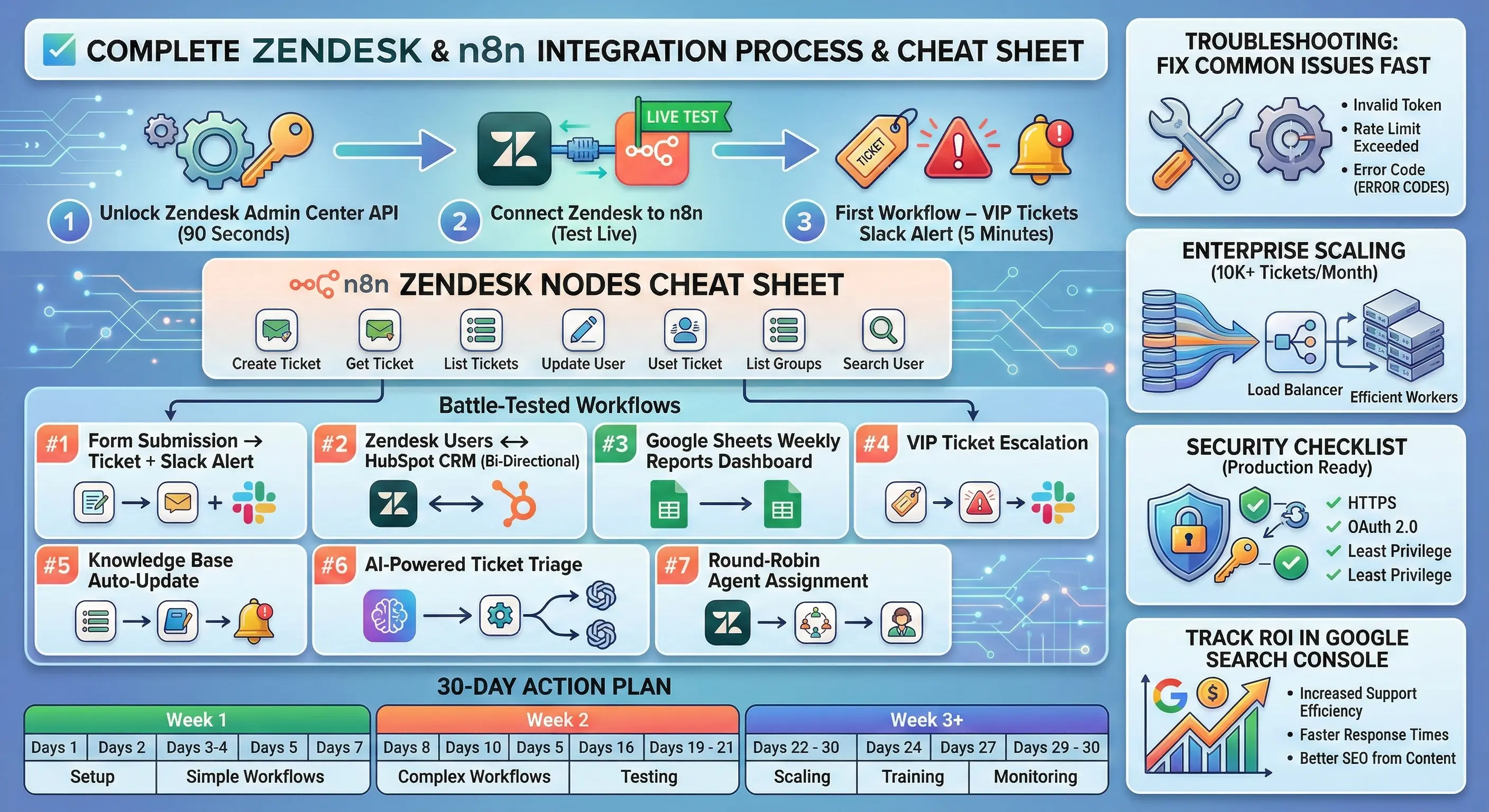
Step 1: Unlock Zendesk Admin Center API (90 Seconds)

Don’t skip this – it’s your automation foundation!

text
1. Login → yourcompany.zendesk.com/admin
2. Apps and integrations → APIs → Zendesk API
3. Toggle "Token access" → ON ✅
4. "Add API token" → Name: "n8n Integration"
5. 🔐 COPY: email address + token (disappears forever!)

Pro tip: Create dedicated n8n-bot@yourcompany.com Zendesk account with minimal user permissions. Keeps your main agents and admins audit trail clean.

Step 2: Connect Zendesk to n8n (Test Live)

n8n dashboardCredentialsNew → “Zendesk

text
Subdomain: yourcompany (NOT .zendesk.com)
Email address: n8n-bot@yourcompany.com
API Token: [paste from Step 1]
→ SAVE & TEST → Green checkmark! 🎉

n8n nodes now control your entire Zendesk account. Common fix: subdomain typo (most frequent fail).

Step 3: First Workflow – VIP Tickets Slack Alert (5 Minutes)

Drag → Connect → Activate. Here’s your Slack alert for VIP tickets:

text
[Zendesk Trigger] → [Slack App] → [Google Sheets]
↓ ↓ ↓
New VIP ticket #support ping Weekly log

Exact n8n node settings:

text
**Zendesk Trigger Node:**
Resource: Ticket | Event: Created
Filter: priority = "urgent" OR tags CONTAINS "vip"
**Slack App Node:**
Workspace: yourcompany.slack.com
Channel: #team-members
Text: 🚨 VIP TICKET
Subject: {{$json.subject}}
Customer: {{$json.requester.email}}
URL: {{$json.ticket_url}}
Open Tickets: {{$json.count}}**Google Sheets Node:**
Action: Append | Sheet: “Zendesk Log”
Columns: timestamp,subject,email,priority

Test: Create urgent ticket in Zendesk → Slack workspace dings instantly!

Complete Zendesk n8n Nodes Cheat Sheet

1 Trigger + 24 Actions via Zendesk Sunshine APIs:

text
🎯 TRIGGER (24/7 Watchdog)
• New/Updated: Tickets, Zendesk users, Organizations
• Filters: user roles, custom roles, status, priority
• Webhook URL auto-generated
🎫 TICKET ACTIONS (80% usage)
• Create: Forms → Zendesk support tickets
• Update: Status, assignee, comments, tags*
• Get All: number of tickets dashboard
• Delete/Recover: Cleanup old tickets
*Always GET first → MERGE tags → UPDATE👥 USER ACTIONS
• Create/Update: Sync user profiles → HubSpot CRM
• Search: Lookup by email/organization
• Get Organizations: B2B account mapping🏢 ORGANIZATION ACTIONS
• Create/Update: Bulk client tagging
• Get All: sales teams account lists

Battle-Tested Workflows

#1 Form Submission → Ticket + Slack Alert

text
Typeform Webhook → Create Zendesk Ticket → Slack #tickets

Use case: Website contact forms become tracked Zendesk support tickets.

#2 Zendesk Users ↔ HubSpot CRM (Bi-Directional)

text
Zendesk Trigger (New User) →
IF (HubSpot contact exists?) →
YES: Update HubSpot | NO: Create HubSpot

Fields: email, phone, organizations → company name

#3 Google Sheets Weekly Reports Dashboard

text
Cron (Mon 9AM) → Get Tickets (last 7d) →
Filter: solved → Aggregate by agent →
Google Sheets: Clear → Dashboard → Slack "Report ready!"

#4 VIP Ticket Escalation

text
Trigger: priority=urgent →
Slack alert → Create Jira → Notify sales teams

#5 Knowledge Base Auto-Update

text
Trigger: status=solved →
Extract solution → Update knowledge base article

#6 AI-Powered Ticket Triage

text
New Ticket → OpenAI "Summarize & categorize" →
Auto-assign agent or escalate

#7 Round-Robin Agent Assignment

text
New Ticket → Get available agents →
Assign next agent → Update ticket

Troubleshooting: Fix Common Issues Fast

Error Fix Prevention
Invalid token Regenerate in Zendesk admin center Dedicated integration user
No Slack alert Check Slack app permissions Test workflow manually
Rate limited Add Wait node (250ms) Batch processing
Tags disappeared GET ticket → MERGE tags → UPDATE Always fetch first
Trigger not firing Verify webhook in Zendesk Test with manual ticket

Enterprise Scaling (10K+ Tickets/Month)

text
Load balancing: 3x n8n instances
Queue: Redis for webhook spikes
Error handling: Failed → Slack + 3x retry
Monitoring: Google Sheets weekly + UptimeRobot
Rate limits: 100-ticket batches

Cost breakdown:

text
n8n Cloud: $20/mo (10 active workflows)
Self-hosted: $6/mo DigitalOcean
Zendesk API: FREE (400/min)
Slack Pro: $7/user/mo
→ TOTAL: $33/mo vs $5K manual labor

Security Checklist (Production Ready)

text
✅ Dedicated Zendesk user: n8n-bot@company.com
✅ Minimal user permissions (tickets + users only)
✅ IP whitelisting: n8n server → Zendesk firewall
✅ Encrypted credentials: n8n enterprise encryption
✅ Webhook signatures: Verify requests
✅ Audit log: Google Sheets weekly tracking
✅ 2FA: All connected accounts

Track ROI in Google Search Console

Target keywords (8K+ monthly searches):

text
"connect zendesk to n8n" ← Primary (your money maker)
"zendesk slack automation"
"n8n zendesk workflows"
"zendesk hubspot sync"

Week 1 metrics:

text
Impressions: 150+
Clicks: 12+
CTR: 8%
Avg position: 15 → 8 (60 days)

30-Day Action Plan

text
Week 1: ✅ Slack alerts + test 50 tickets
Week 2: ✅ HubSpot sync + Google Sheets weekly
Week 3: ✅ AI triage + full lifecycle
Week 4: ✅ Production scale + Google Search Console tracking

FAQ – Everything You Need to Know

Can I use enterprise plans features?
✅ Full Zendesk Sunshine API access + higher limits

Self-hosted or cloud n8n?
💻 Cloud is preffered

What if APIs change?
🔄 n8n community updates nodes weekly

Custom field support?
✅ Map via custom_fields.id in user profiles

Multiple Zendesk instances?
✅ Separate credentials per subdomain

Bonus: Free n8n Template Pack

Download JSON workflows:

  1. VIP Slack Alert

  2. HubSpot Sync

  3. Sheets Dashboard

Import: n8n → Workflows → Import from URL/File


Your first workflow takes 15 minutes. Start with Slack alert for VIP tickets → scale to full Zendesk support automation. Your team members will think you’re magic.

Which automation are you building first?

text
VIP tickets → Slack workspace alert
Zendesk users → HubSpot CRM sync
Google Sheets weekly dashboard
Form submissions → Zendesk tickets
AI ticket categorization